Understanding PrompTessor: AI Prompt Optimization Tool and Prompt Workspace
Artificial intelligence has become part of how people write, research, code, create, plan, and solve problems. From generating content to building workflows, AI tools can help users move faster and work more efficiently.
But one thing still has a major impact on the quality of every AI response:
The prompt.
A prompt is more than a simple instruction. It is the way you communicate your goal, context, expectations, constraints, and desired output to an AI system. When a prompt is unclear, incomplete, or too generic, the result often becomes generic as well. When a prompt is clear, specific, and well-structured, the AI has a much better chance of producing a useful answer.
That is where PrompTessor comes in.
PrompTessor is an AI prompt optimization tool and prompt workspace that helps users generate, analyze, optimize, refine, reverse-engineer, save, and reuse prompts for better AI results.
PrompTessor started with a simple idea: better prompts lead to better AI outputs. Today, it has evolved beyond prompt optimization into a broader workspace for building better prompt workflows across ChatGPT, Claude, Gemini, and other AI models.
Instead of relying on guesswork, PrompTessor helps users turn rough ideas into structured prompts, identify prompt weaknesses, improve prompt quality, refine versions with feedback, reverse-engineer content into prompts, and save reusable prompts in a prompt library.
Key Takeaways
- PrompTessor is an AI prompt optimization tool and prompt workspace for creating better AI prompts.
- It helps users generate, analyze, optimize, refine, reverse-engineer, save, and reuse prompts in one place.
- Prompt optimization still matters because AI models depend heavily on the clarity, context, structure, and constraints of the prompt.
- PrompTessor supports workflows for ChatGPT, Claude, Gemini, and other AI models.
- It is useful for creators, marketers, developers, founders, students, researchers, prompt engineers, and everyday AI users.
Table of Contents
- What Is PrompTessor?
- Why Prompt Optimization Still Matters
- PrompTessor as an AI Prompt Workspace
- How PrompTessor Works
- Core Features of PrompTessor
- Who Can Use PrompTessor?
- PrompTessor vs Manual Prompt Writing
- PrompTessor vs Using Separate Prompt Tools
- Why Prompt Workflows Matter
- FAQ About PrompTessor
- Start Creating Better Prompts With PrompTessor
- Conclusion
What Is PrompTessor?
PrompTessor is an AI-powered platform designed to help users create better prompts and build better prompt workflows.
At its core, PrompTessor helps users improve how they communicate with AI. It can generate prompts from rough ideas, analyze prompt quality, identify what can be improved, create optimized prompt versions, refine prompts with feedback, and save useful prompts for future use.
In other words, PrompTessor is both an AI prompt optimization tool and an AI prompt workspace.
As a prompt optimization tool, PrompTessor helps users improve weak, vague, or incomplete prompts. As a prompt workspace, it helps users manage the full prompt workflow: generation, analysis, optimization, refinement, reverse prompting, prompt history, and prompt library management.
This makes PrompTessor useful for anyone who works with AI regularly, including creators, marketers, developers, founders, students, researchers, prompt engineers, and everyday users.
Whether you are writing a blog post, generating marketing copy, creating image prompts, asking for coding help, researching a topic, brainstorming product ideas, or building reusable AI workflows, PrompTessor helps you turn rough instructions into clearer and more effective prompts.
Why Prompt Optimization Still Matters
AI models are powerful, but they still depend heavily on the quality of the input they receive.
A simple prompt like:
Write a product description.
can produce an answer, but the result may be too broad, generic, or incomplete.
A stronger prompt might include the product type, target audience, tone of voice, key benefits, word count, structure, examples, constraints, and desired output format.
That additional context helps the AI understand what kind of output you actually want.
Prompt optimization matters because it helps improve:
- Clarity
- Relevance
- Accuracy
- Structure
- Specificity
- Output consistency
- Workflow repeatability
A better prompt gives the AI better direction. PrompTessor helps make that process easier by showing users what their prompt is missing and how it can be improved.
For users who want to learn more about the fundamentals behind this process, this guide on what prompt engineering is and how to write better AI prompts explains the core principles of better AI communication.
PrompTessor as an AI Prompt Workspace
PrompTessor is no longer only about analyzing or optimizing one prompt at a time.
It is now better understood as an AI prompt workspace: a place where users can create, improve, refine, organize, and reuse prompts across different workflows.
This matters because prompt work is often not a one-step process.
A user may start with a rough idea, generate a prompt, analyze the quality, optimize weak parts, refine the prompt for a specific model or output style, save the final version, and reuse it later for another project.
PrompTessor brings these steps into one workflow:
- Generate prompts from rough ideas
- Analyze prompt quality
- Optimize weak or incomplete prompts
- Refine prompts with feedback
- Reverse-engineer content into reusable prompts
- Save prompts in a prompt library
- Track prompt history over time
This makes PrompTessor useful not only for prompt optimization, but also for building a reusable prompt system.
How PrompTessor Works
PrompTessor makes prompt creation and improvement more structured.
You can start from different points depending on your workflow.
If you already have a prompt, you can analyze it to understand its strengths and weaknesses. PrompTessor can evaluate the prompt based on important quality factors such as clarity, specificity, context, goal orientation, structure, and constraints.
If you only have a rough idea, you can use PrompTessor to generate a more complete prompt from scratch.
If you have content, images, videos, URLs, or text that you want to recreate or learn from, you can use Reverse Prompt to infer a likely prompt behind that content.
After that, PrompTessor can help you optimize, refine, save, and reuse the prompt.
This means you do not only get a better prompt. You also get a clearer workflow for creating better prompts again in the future.
Core Features of PrompTessor
1. Prompt Generator
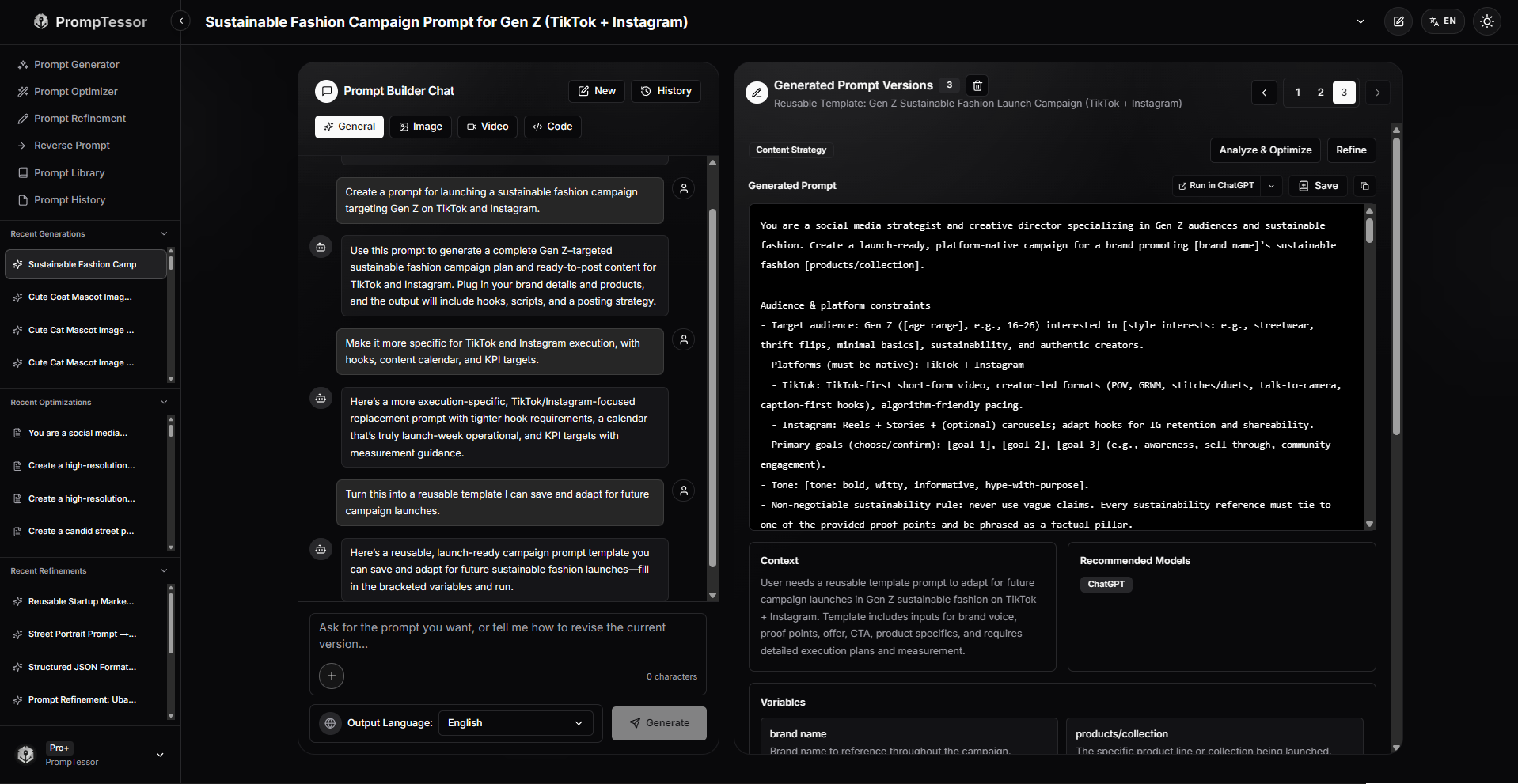
PrompTessor includes an AI prompt generator that helps users create professional prompts from rough ideas.
Instead of starting with a blank page, users can describe what they want to create, analyze, write, plan, or build. PrompTessor can then help turn that idea into a clearer and more structured prompt.
For example, a rough idea like:
Create a prompt for a marketing campaign.
can become a more complete prompt with a target audience, campaign goal, platform, tone, output format, and reusable variables.
This is useful for users who know what they want from AI but are not sure how to write the prompt properly.
You can also read this guide on AI prompt generators for any AI model to understand how prompt generation works across ChatGPT, Claude, Gemini, and other AI tools.
2. Prompt Analysis
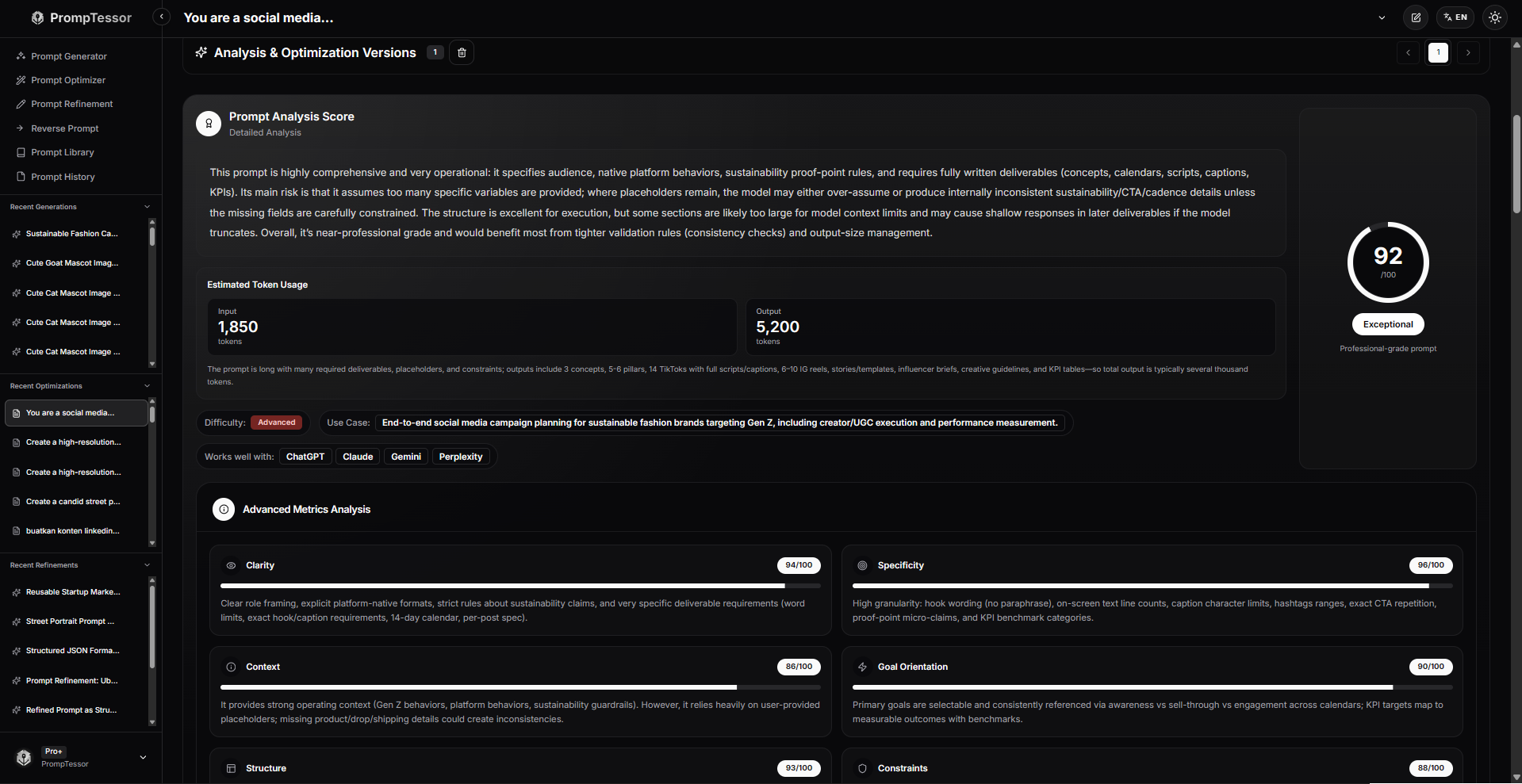
PrompTessor analyzes your prompt and helps you understand its strengths and weaknesses.
It can identify common prompt issues such as vague instructions, missing context, unclear goals, weak structure, or lack of output format.
This helps users understand why an AI response may not be as good as expected.
Instead of repeatedly testing different prompts manually, you can use PrompTessor to review the quality of your prompt before using it with an AI system.
3. Prompt Optimizer
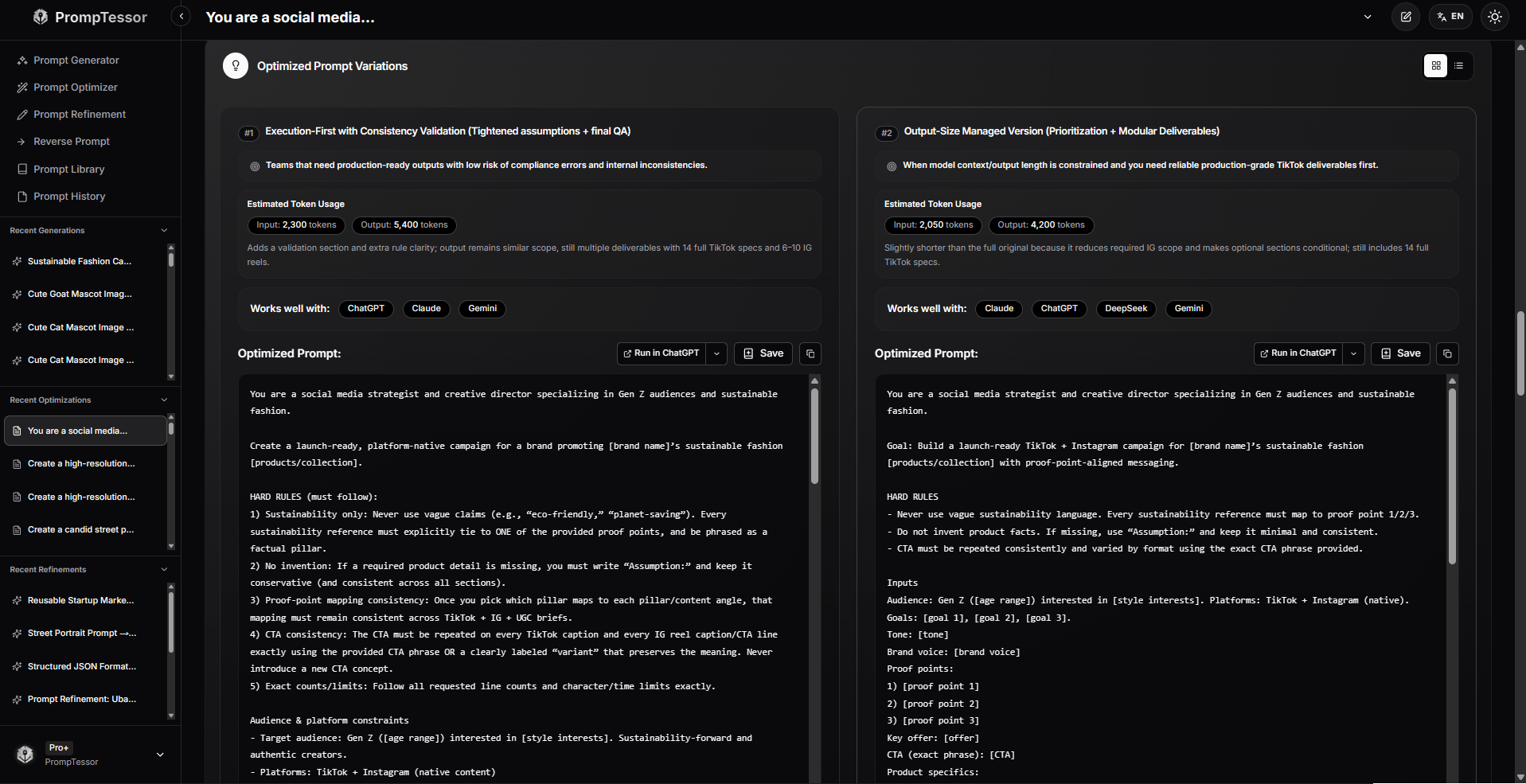
After analyzing your prompt, PrompTessor can generate optimized prompt versions.
These optimized prompts are designed to be clearer, more specific, and more complete. They help AI systems better understand your request and produce more useful responses.
Prompt optimization is especially helpful when you want to improve results for writing, coding, research, marketing, brainstorming, visual content, or creative workflows.
4. Prompt Refinement
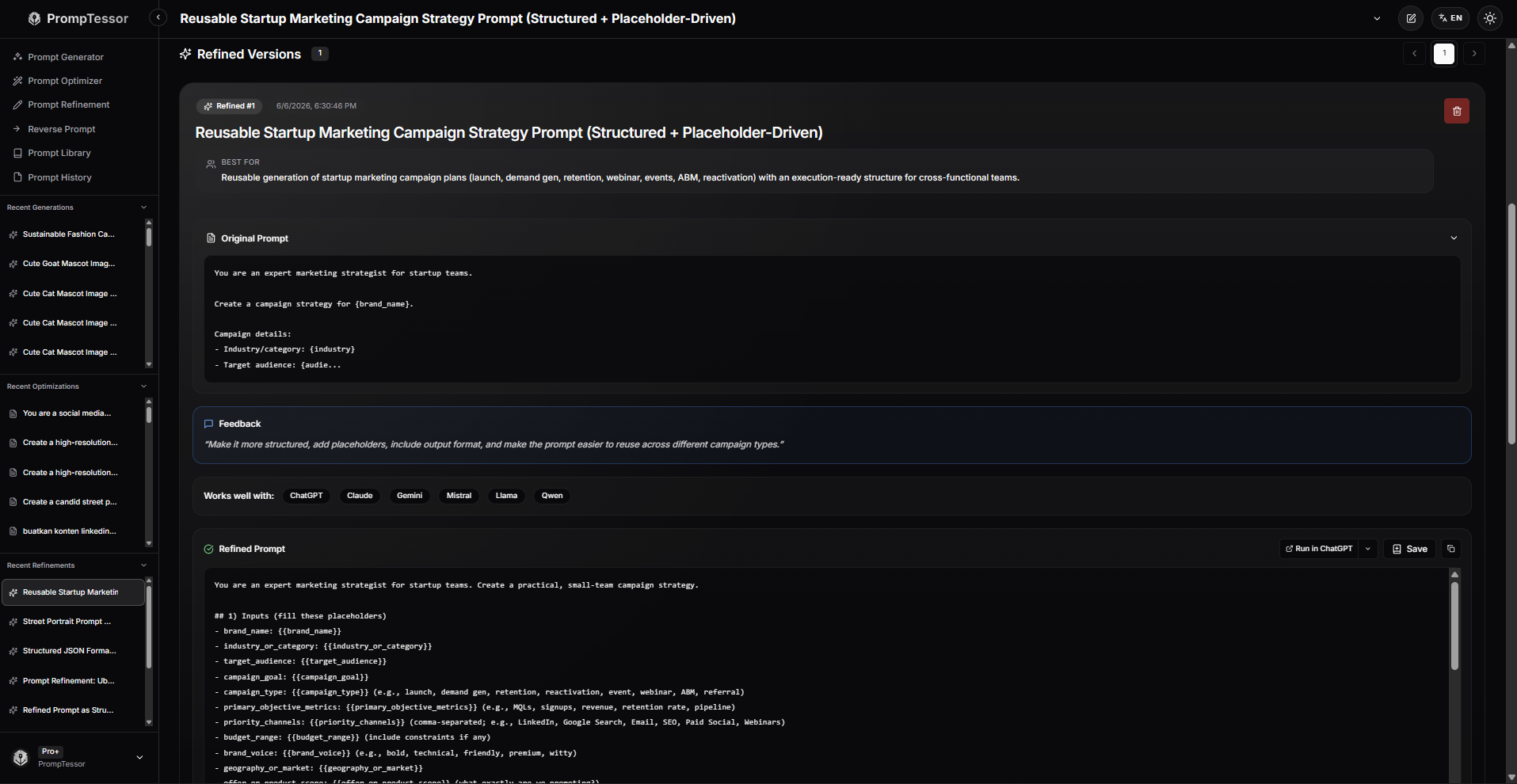
Prompt optimization is often not a one-time process.
Sometimes you need to adjust a prompt based on a specific goal, AI model, output format, tone, or workflow.
With Prompt Refinement, PrompTessor helps users improve existing prompts through feedback, formatting options, and iterative improvements.
For example, you can refine a prompt to make it more detailed, more concise, more creative, more professional, better structured, or more suitable for ChatGPT, Claude, Gemini, or another AI model.
This gives users more control over the final prompt and helps turn one prompt idea into a stronger, reusable version.
5. Reverse Prompt

PrompTessor also includes a feature called Reverse Prompt.
Reverse Prompt helps users infer or recreate the likely prompt behind a piece of content, such as text, images, videos, URLs, and other input types.
This is especially useful when you see an AI-generated result and want to understand how a similar output might have been created.
For creators, marketers, designers, and AI users, Reverse Prompt can help turn inspiration into reusable prompt ideas.
6. Prompt Library
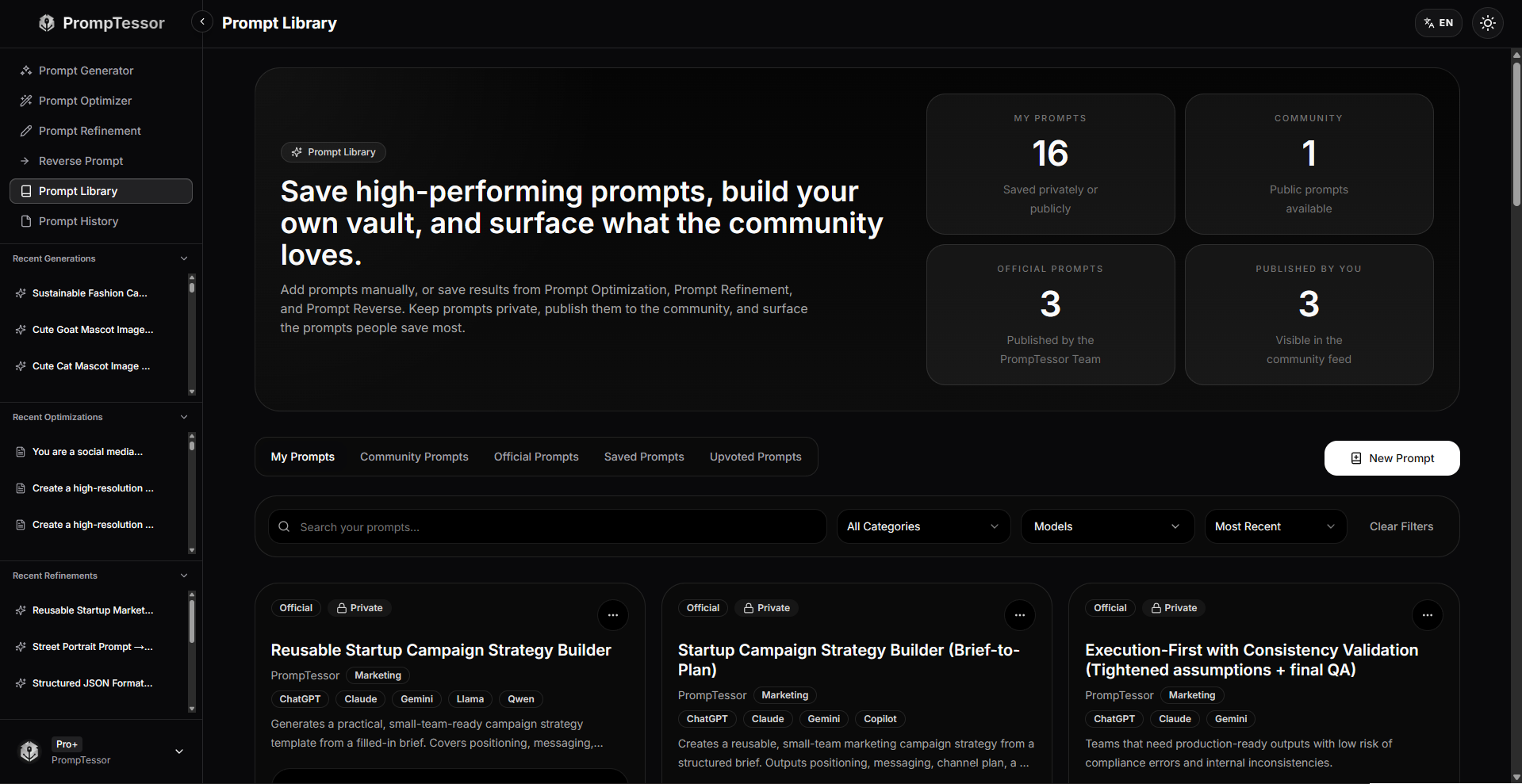
PrompTessor includes a prompt library where users can save, organize, and reuse their best prompts.
This is important because good prompts should not disappear after one use.
If a prompt works well, you may want to reuse it for future campaigns, writing projects, coding workflows, product research, visual content, or internal processes.
A prompt library helps turn successful prompts into reusable assets.
7. Prompt History and Versioning
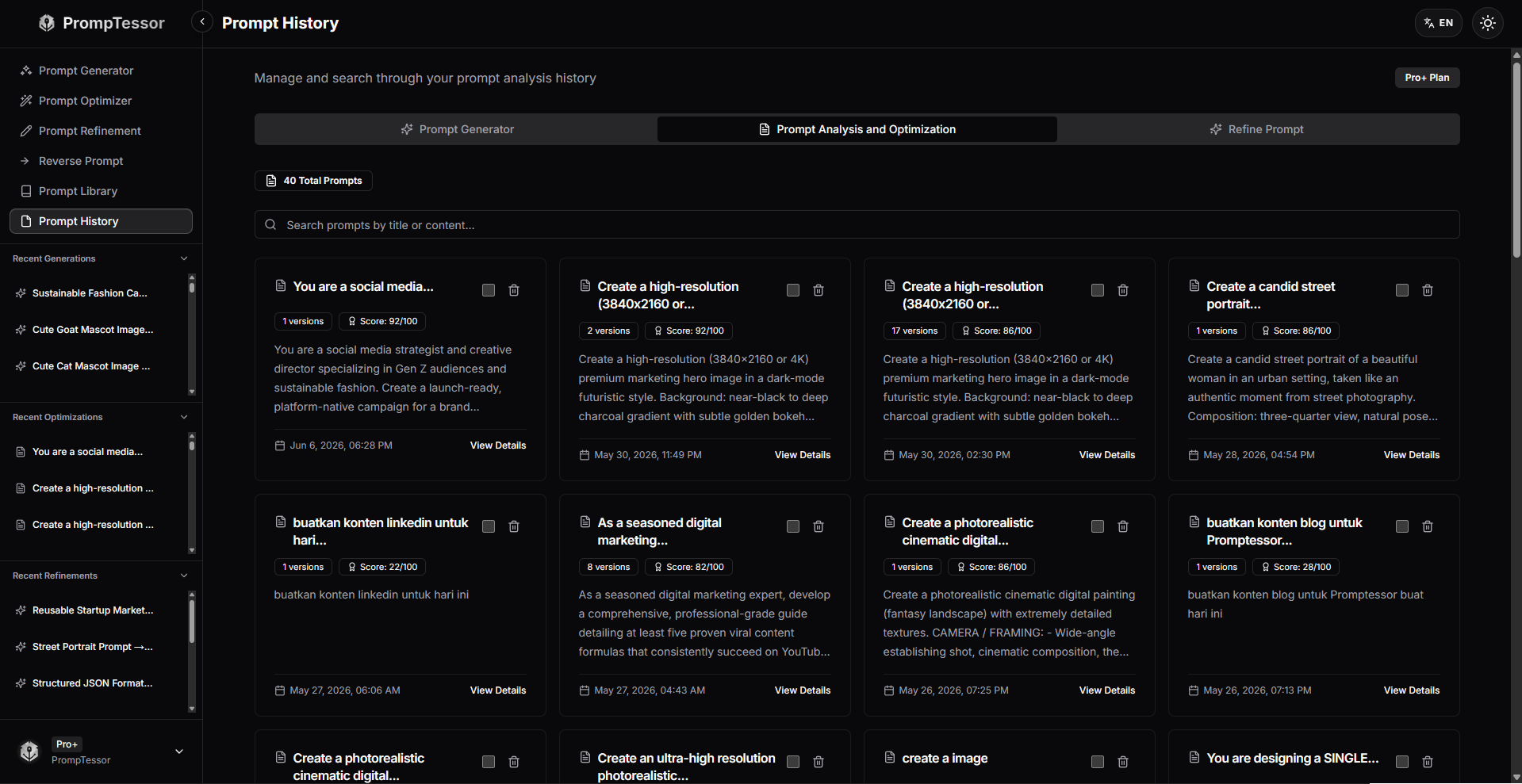
PrompTessor helps users track prompt activity and prompt versions over time.
This allows users to revisit previous prompts, compare generated and optimized versions, continue refining prompts, and understand how a prompt has changed across different iterations.
For users who work with AI regularly, prompt history and versioning can become a useful record of generated, optimized, refined, and reverse-engineered prompts.
Who Can Use PrompTessor?
PrompTessor is designed for anyone who wants better results from AI.
Content Creators
Content creators can use PrompTessor to generate and improve prompts for blog posts, video scripts, social media content, newsletters, storytelling, captions, outlines, and creative writing.
Marketers
Marketers can use PrompTessor to create stronger prompts for ads, landing pages, email campaigns, SEO content, audience research, product messaging, launch plans, and content calendars.
Developers
Developers can use PrompTessor to improve prompts for code generation, debugging, documentation, technical explanations, architecture planning, testing, and software workflows.
Founders and Entrepreneurs
Founders can use PrompTessor to generate better prompts for product ideas, market research, competitor analysis, launch content, positioning, customer research, meeting summaries, and business strategy.
Students and Researchers
Students and researchers can use PrompTessor to create clearer prompts for summaries, explanations, study plans, research outlines, academic assistance, and document analysis.
Designers and Visual Creators
Designers and visual creators can use PrompTessor to create prompts for image generation, video concepts, visual directions, scene descriptions, product photography, thumbnails, and creative inspiration.
Everyday AI Users
You do not need to be a prompt engineering expert to use PrompTessor.
If you use AI for productivity, learning, problem solving, planning, or daily tasks, PrompTessor can help you ask better questions and get better answers.
PrompTessor vs Manual Prompt Writing
Writing prompts manually can work, but it often takes trial and error.
You may need to test several versions before finding one that produces the result you want. You may also forget to include important details such as context, tone, format, examples, target audience, or constraints.
PrompTessor helps reduce that trial-and-error process.
Instead of guessing what went wrong, you can analyze your prompt, understand the missing elements, generate stronger versions, refine the result, and save the final prompt for reuse.
This makes PrompTessor useful for both beginners and experienced AI users.
Beginners can use it to learn how better prompts are structured. Experienced users can use it to save time and improve prompt quality at scale.
PrompTessor vs Using Separate Prompt Tools
Many AI users use different tools for different parts of the prompt process.
They may use one tool to generate prompts, another tool to improve prompts, another tool to store prompts, and another document or spreadsheet to track prompt versions.
This can work, but it can also become messy.
PrompTessor brings the prompt workflow into one place. Instead of separating generation, analysis, optimization, refinement, reverse prompting, prompt history, and prompt library management, PrompTessor connects these steps in a single workspace.
| Workflow Need | Using Separate Tools | Using PrompTessor |
|---|---|---|
| Generate prompts | Use a separate prompt generator or chatbot | Generate prompts inside the same workspace |
| Analyze prompt quality | Manually review or guess what is missing | Use prompt analysis to identify weak areas |
| Optimize prompts | Rewrite prompts manually | Create optimized prompt versions |
| Refine versions | Copy prompts between tools | Refine prompts with feedback in one workflow |
| Reverse-engineer prompts | Manually guess how content was created | Use Reverse Prompt for text, images, videos, URLs, and other input types |
| Save reusable prompts | Use documents, notes, or spreadsheets | Save and organize prompts in a prompt library |
| Track prompt versions | Manually manage previous versions | Use prompt history to revisit and reuse previous work |
This is what makes PrompTessor more than a basic prompt optimizer. It is built to support the full prompt workflow.
Why Prompt Workflows Matter
As AI becomes part of daily work, prompt quality becomes more important.
But prompt quality is not only about writing one good prompt. It is also about building a repeatable process for creating, testing, improving, and reusing prompts.
A better prompt workflow can help users:
- Save time on repeated tasks
- Improve output consistency
- Reuse successful prompts
- Reduce manual rewriting
- Build better AI workflows
- Learn what makes prompts effective
PrompTessor supports this process by helping users move from rough ideas to structured, optimized, and reusable prompts.
For more practical examples, read 10 AI prompt examples and techniques for better AI outputs and prompt engineering best practices for building more reliable AI workflows.
FAQ About PrompTessor
What is PrompTessor?
PrompTessor is an AI prompt optimization tool and prompt workspace that helps users generate, analyze, optimize, refine, reverse-engineer, save, and reuse prompts for better AI results.
Is PrompTessor only a prompt optimizer?
No. PrompTessor includes prompt optimization, but it has evolved into a broader AI prompt workspace. It can help users generate prompts, analyze prompt quality, optimize weak prompts, refine prompts with feedback, use Reverse Prompt, save prompts in a library, and track prompt history.
What is an AI prompt workspace?
An AI prompt workspace is a place where users can create, improve, organize, and reuse prompts. Instead of only writing one prompt, users can manage the full prompt workflow from generation to optimization, refinement, storage, and reuse.
Can PrompTessor generate prompts?
Yes. PrompTessor includes a Prompt Generator that helps users create structured prompts from rough ideas, goals, formats, or workflows.
How does PrompTessor improve prompts?
PrompTessor evaluates prompts based on quality factors such as clarity, specificity, context, goal orientation, structure, and constraints. It then provides feedback and optimized prompt versions that are easier for AI systems to understand.
Can PrompTessor reverse-engineer prompts from images or videos?
Yes. PrompTessor includes Reverse Prompt, which can help users infer or recreate likely prompts from content such as text, images, videos, URLs, and other input types.
Can I save prompts in PrompTessor?
Yes. PrompTessor includes a Prompt Library that helps users save, organize, and reuse their best prompts across projects and workflows.
Does PrompTessor work with ChatGPT, Claude, Gemini, and other AI models?
Yes. PrompTessor is designed to help users create and improve prompts that can be used across ChatGPT, Claude, Gemini, and other AI models.
Who is PrompTessor for?
PrompTessor is useful for content creators, marketers, developers, founders, students, researchers, prompt engineers, designers, and everyday AI users who want clearer, more useful, and more consistent AI outputs.
Start Creating Better Prompts With PrompTessor
PrompTessor is more than a prompt rewriting tool.
It is an AI prompt optimization tool and prompt workspace built to help users generate, understand, improve, refine, and reuse their prompts.
Whether you are creating content, building products, writing code, researching ideas, planning campaigns, designing visual content, or using AI for daily productivity, PrompTessor helps you get more useful results from AI systems.
If you want better AI results, the best place to start is with a better prompt.
And PrompTessor is designed to help you create exactly that.
Conclusion
PrompTessor has evolved from an AI prompt optimization tool into a more complete AI prompt workspace.
It helps users generate prompts, analyze prompt quality, receive actionable feedback, create optimized versions, refine prompts with feedback, reverse-engineer content into prompts, save reusable prompts, and track prompt history.
In a world where AI is becoming part of everyday work, knowing how to create effective prompts is becoming more important than ever.
PrompTessor makes that process easier, faster, and more structured.
Better prompts lead to better AI results, and PrompTessor helps you build them.
Build better prompts in one workspace
Generate prompts from ideas, analyze and optimize quality, refine with feedback, reverse-engineer content, and save reusable prompts in your Prompt Library.
Try PrompTessor Free