Claude Code Agent Teams: Examples and Multi-Agent Workflows for Parallel Development in 2026
Claude Code can already delegate focused work to subagents, load reusable procedures from Skills, and run deterministic automation through Hooks.
Agent Teams add a different capability: several independent Claude Code sessions can work together as a coordinated team.
Instead of every worker reporting only to one main agent, teammates can work in separate context windows, share a task list, message one another directly, challenge findings, and coordinate independent parts of a larger task.
This makes Agent Teams useful for work where collaboration and parallel exploration create real value: pull request review, debugging with competing hypotheses, architecture research, cross-layer feature development, migration planning, incident investigation, and independent implementation plus verification.
But more agents do not automatically produce a better result.
Every teammate is another Claude instance with its own context window and token usage. Coordination adds overhead. Parallel edits to the same files can conflict. Sequential work with many dependencies may become slower rather than faster.
The goal is not to maximize the number of agents.
The goal is to divide a problem into meaningful, independent work and give the team enough structure to coordinate that work safely.
This guide explains how Claude Code Agent Teams work, how to enable them, how the team lead and teammates coordinate, how shared tasks and direct messaging work, how models and permissions behave, how plan approval and quality gates improve reliability, and how to design practical multi-agent development workflows.
Quick Answer
Claude Code Agent Teams are an experimental feature for coordinating multiple independent Claude Code sessions.
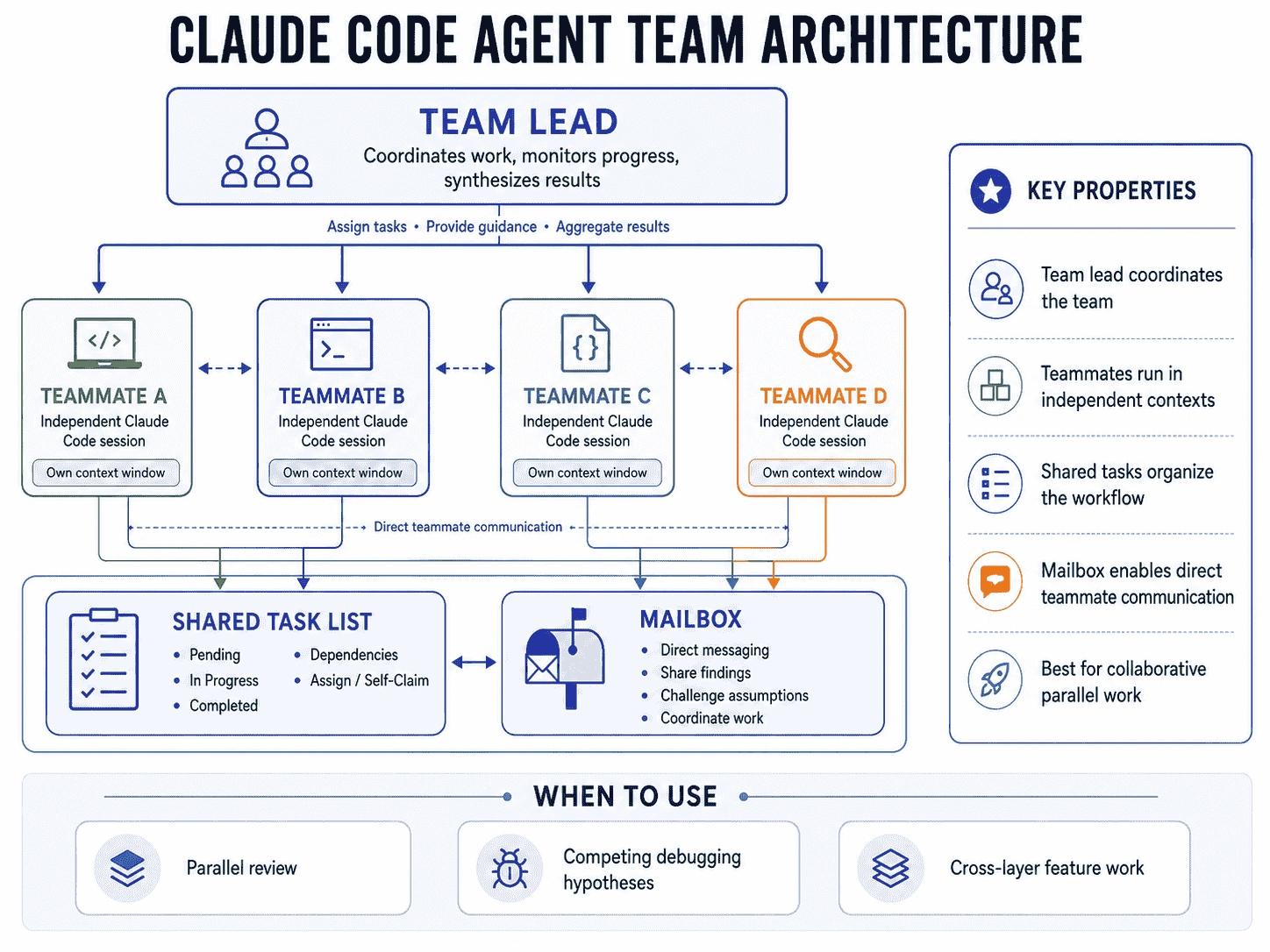
A team has four core components:
- Team lead: the main Claude Code session that coordinates work.
- Teammates: separate Claude Code sessions with independent context windows.
- Shared task list: a common list of pending, in-progress, and completed work.
- Mailbox: the communication layer agents use to exchange messages.
Use Agent Teams when workers need to collaborate with each other while working in parallel.
Use subagents when a focused worker only needs to return a result to the caller.
Use Dynamic Workflows when orchestration itself should be encoded as repeatable JavaScript rather than decided turn by turn by a lead agent.
Key Takeaways
- Agent Teams are experimental and disabled by default.
- Enable them with
CLAUDE_CODE_EXPERIMENTAL_AGENT_TEAMS=1. - The first spawned teammate forms the team and the main session becomes the lead.
- Current Claude Code no longer uses separate
TeamCreateorTeamDeletetools for this workflow. - Each teammate is a separate Claude Code instance with its own context window.
- Teammates can communicate directly instead of reporting only through the lead.
- The shared task list coordinates work, dependencies, assignment, and self-claiming.
- Plan approval can keep a teammate read-only until the lead accepts its implementation plan.
TaskCreated,TaskCompleted, andTeammateIdlehooks can enforce quality gates.- Custom subagent definitions can be reused as teammate roles.
- Teammates load project context such as applicable
CLAUDE.mdfiles, Skills, and MCP configuration, but do not inherit the lead's conversation history. - Agent Teams use significantly more tokens than a single session or lightweight subagents.
- Three to five focused teammates is a practical starting point for many workflows.
- Parallel file ownership matters because teammates editing the same file can overwrite each other.
- Sequential workflows with heavy dependencies are usually better handled by a single session, subagents, or a scripted Dynamic Workflow.
Table of Contents
- What Are Claude Code Agent Teams?
- How Agent Teams Work
- Why Use Multiple Claude Code Agents?
- Agent Teams vs. Subagents
- Agent Teams vs. Dynamic Workflows
- When to Use Agent Teams
- When Not to Use Agent Teams
- Experimental Status and Requirements
- How to Enable Agent Teams
- Start Your First Agent Team
- Anatomy of an Agent Team
- The Team Lead
- Teammates
- Shared Task Lists and Dependencies
- Inter-Agent Messaging
- Models and Reasoning Effort
- Plan Approval
- In-Process and Split-Pane Modes
- Use Custom Subagent Definitions as Teammates
- Hooks and Quality Gates
- Permissions and Security
- Context and Communication
- Token Usage and Cost
- Best Claude Code Agent Team Examples
- Multi-Agent Workflow Patterns
- Avoiding File Conflicts
- Monitoring and Steering Teammates
- Shutting Down Teammates
- Common Agent Team Mistakes
- Current Limitations
- Using PrompTessor to Improve Team Instructions
- Claude Code Agent Team Checklist
- Official Resources
- FAQ
What Are Claude Code Agent Teams?
Claude Code Agent Teams coordinate several Claude Code sessions around one shared objective.
The main session becomes the team lead. It can spawn teammates, create or assign tasks, receive messages, monitor progress, and synthesize results.
Each teammate is a full Claude Code session with an independent context window.
Main Claude Code Session
          │
          ▼
       TEAM LEAD
      /    |     \
     /     |      \
    ▼      ▼       ▼
Teammate A B       Teammate C
    ↕      ↕        ↕
    └── Shared Tasks ──┘
           ↕
        Mailbox
This architecture is useful when each worker can own a meaningful slice of the problem and collaboration between workers improves the final result.
Collaboration, Not Just Delegation
Consider a pull request review.
With subagents, the main agent can ask three workers to inspect security, tests, and performance. Each subagent returns its result to the caller.
With an Agent Team, those reviewers can also message one another. A security reviewer can ask whether a compatibility change affects an authorization boundary. A test reviewer can challenge a finding that lacks a reproducible case. The reviewers can resolve duplicates before the lead produces the final report.
That direct collaboration is the central reason to use Agent Teams instead of ordinary delegation.
How Agent Teams Work
A typical workflow looks like this:
- You give the main Claude Code session a task that benefits from parallel work.
- You explicitly request teammates, or Claude proposes them and you approve.
- The first teammate is spawned and the main session acts as team lead.
- The lead creates or organizes tasks.
- Teammates work independently in their own contexts.
- They update the shared task list and exchange messages when useful.
- The lead monitors progress, redirects work, and resolves dependencies.
- The lead synthesizes the final result after required work is complete.
Current Claude Code handles runtime team state automatically. Do not create a project-level team configuration file or manually edit generated runtime state.
If you want reusable teammate behavior, define a custom subagent role and ask the lead to spawn a teammate using that agent type.
Why Use Multiple Claude Code Agents?
Parallelism helps when the work can actually proceed independently.
A good Agent Team task has several characteristics:
- There are multiple meaningful lines of investigation.
- Workers can make progress without waiting on every other worker.
- Each teammate can have a clear deliverable.
- Different perspectives improve confidence.
- Communication between workers adds value.
Parallel Exploration
A single agent often follows the first plausible path it finds. Several teammates can explore different hypotheses at the same time.
Independent Verification
An implementation can be reviewed by agents that did not produce it. This reduces the chance that the same assumptions are repeated during verification.
Context Separation
A performance reviewer does not need every detail collected by a security reviewer. Independent context windows keep specialized work focused.
Direct Collaboration
Teammates can share discoveries, challenge weak evidence, and coordinate dependencies without routing every message manually through the lead.
Agent Teams vs. Subagents
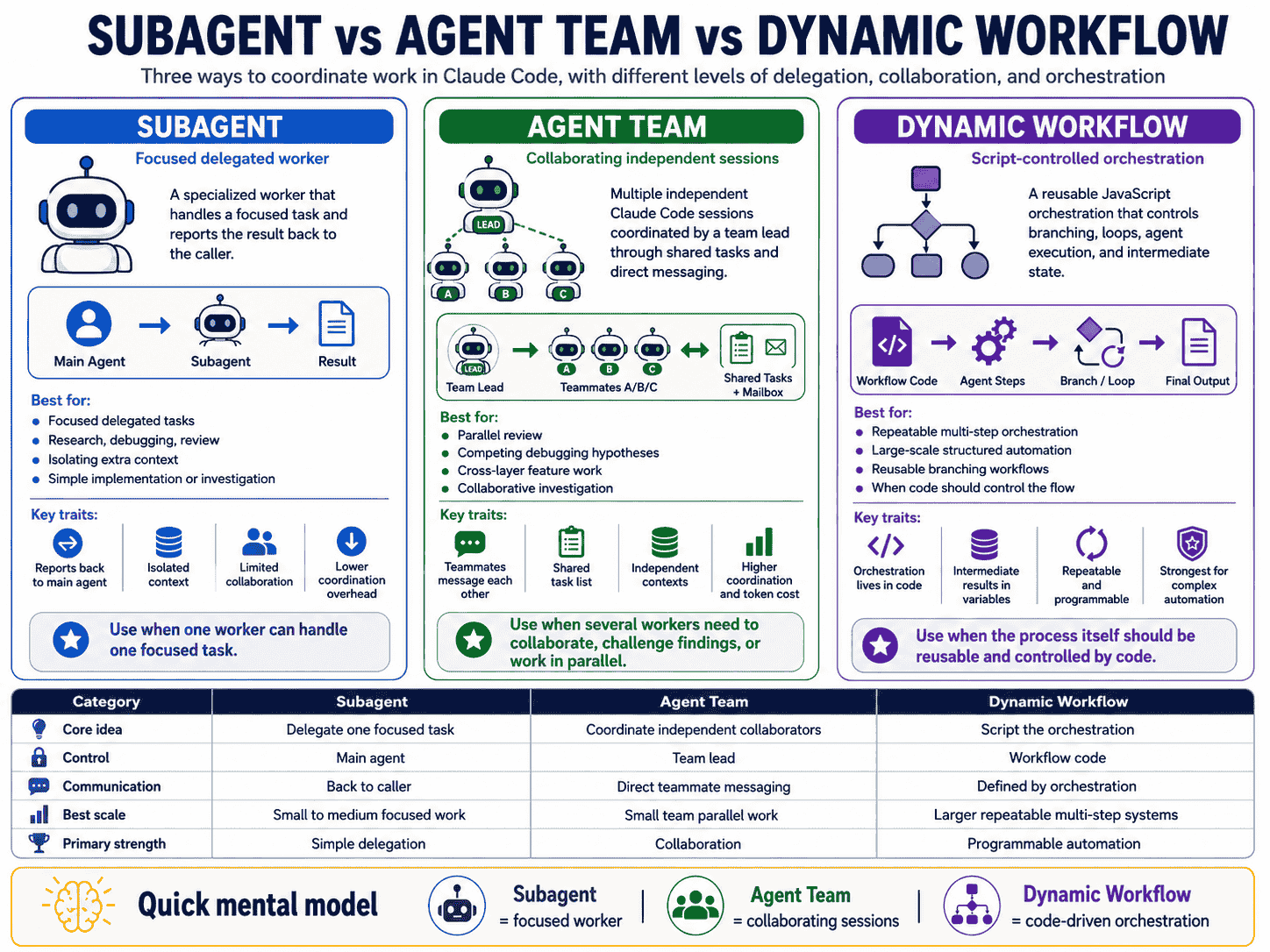
| Capability | Subagent | Agent Team |
|---|---|---|
| Context | Separate worker context | Independent Claude Code session |
| Communication | Returns result to caller | Teammates can message each other directly |
| Coordination | Main agent manages delegation | Shared task list plus lead coordination |
| Best for | Focused delegated tasks | Collaborative parallel work |
| Token overhead | Usually lower | Higher because each teammate is a separate instance |
Use a subagent when only the result matters. Use an Agent Team when workers need to exchange information, challenge each other, or coordinate progress.
For reusable delegated workers, see Claude Code subagents and custom agent examples.
Agent Teams vs. Dynamic Workflows
Agent Teams and Dynamic Workflows can both coordinate many agents, but the orchestration model is different.
| Approach | Who Controls the Next Step? | Where Intermediate State Lives | Best Use |
|---|---|---|---|
| Subagents | Claude | Claude context | A few focused delegated tasks |
| Skills | Claude following reusable instructions | Claude context | Repeatable procedures |
| Agent Teams | Team lead | Shared task coordination plus individual contexts | A handful of collaborative peers |
| Dynamic Workflows | JavaScript orchestration | Script variables | Repeatable orchestration at larger scale |
Agent Teams are conversational orchestration. Dynamic Workflows move the plan into code.
When to Use Agent Teams
Research and Review
Assign different dimensions to independent teammates such as security, performance, compatibility, testing, and architecture. The team can compare findings before the lead reports them.
Debugging With Competing Hypotheses
Give each teammate a different root-cause theory and explicitly tell them to disprove the others. This reduces anchoring on the first plausible explanation.
New Features With Independent Ownership
A feature spanning frontend, backend, tests, and documentation can work well when each teammate owns a separate file set or layer.
Cross-Layer Coordination
One teammate can own the API contract, another the interface, another tests, and another verification.
Independent Implementation and Review
One teammate implements while another derives acceptance tests or reviews architecture independently, then the lead reconciles their outputs.
When Not to Use Agent Teams
Small Routine Tasks
Spawning several Claude instances to rename a function or fix a local typo creates more overhead than value.
Highly Sequential Work
Task A
  ↓
Task B
  ↓
Task C
  ↓
Task D
If almost every task waits on the previous task, parallelism provides little benefit.
Same-File Editing
Two teammates editing the same file can overwrite one another. Prefer ownership boundaries that map to different modules, layers, packages, or files.
Extremely Interdependent Tasks
If every worker needs constant updates from every other worker, coordination becomes the bottleneck.
Cost-Sensitive Routine Work
Each teammate consumes tokens independently. Use additional agents only when the expected improvement in speed, confidence, or breadth justifies the cost.
Experimental Status and Requirements
Agent Teams are currently experimental and disabled by default.
Current limitations affect session resumption, task coordination, shutdown, nested teams, and some background-agent behavior. Treat the feature as a coordination layer that still requires observation rather than as unattended infrastructure.
How to Enable Claude Code Agent Teams
Enable Agent Teams through your environment or Claude Code settings:
{
  "env": {
    "CLAUDE_CODE_EXPERIMENTAL_AGENT_TEAMS": "1"
  }
}
After enabling it, start a Claude Code session and explicitly ask for an Agent Team when the task genuinely benefits from parallel work.
Do not create runtime team directories or configuration files manually.
Start Your First Agent Team
A good first team has independent roles and one clear shared objective.
Spawn an agent team to review the current pull request.

Use three teammates:

1. security-reviewer
   Review authentication, authorization, input handling,
   secret exposure, and trust boundaries.

2. test-reviewer
   Review existing test coverage, important failure cases,
   and missing regression tests.

3. compatibility-reviewer
   Review API, schema, dependency, database, and backward
   compatibility risks.

Have each teammate investigate independently.

After the first pass:
- Share important findings with the other reviewers.
- Challenge findings that do not have evidence.
- Remove duplicates.
- Distinguish confirmed defects from possible concerns.

Do not modify files.

The team lead should synthesize the final report with:
- Severity
- File and location
- Evidence
- Impact
- Recommended correction
- Verification method
This is a better first workflow than asking several agents to edit the same feature simultaneously.
Anatomy of an Agent Team
Team Lead
The main Claude Code session becomes the lead. It spawns teammates, coordinates work, assigns tasks, receives messages, and synthesizes results.
Teammates
Each teammate is a separate Claude Code instance with its own context window.
Shared Task List
The task list is visible to the team and coordinates work status and dependencies.
Mailbox
Claude Code provides a messaging system between agents. Teammate messages are delivered to recipients automatically.
Runtime State
Claude Code generates local runtime files for team state and tasks. Do not pre-author or manually edit the runtime team config. Use custom subagent definitions when you need reusable teammate roles.
The Team Lead
The lead should do more than summarize results.
- Break the objective into independent tasks.
- Choose scopes that minimize overlap.
- Give enough task-specific context to each teammate.
- Track dependencies.
- Monitor idle or blocked workers.
- Redirect approaches that are not producing evidence.
- Resolve contradictory findings.
- Wait for required teammates before declaring completion.
Give the Lead Explicit Coordination Rules
Coordinate the team using these rules:

- Keep file ownership non-overlapping.
- Do not start implementation until architecture and API tasks are complete.
- Require evidence for every review finding.
- Ask teammates to challenge duplicated or speculative findings.
- Wait for all blocking tasks before final synthesis.
- Do not mark the work complete until tests and verification finish.
Teammates
Teammates load project context like regular Claude Code sessions, including applicable project instructions, Skills, and MCP configuration. They do not receive the lead's conversation history.
This makes the spawn instruction important.
Weak Teammate Instruction
Review security.Stronger Teammate Instruction
Review the authentication module under src/auth/.

Focus on:
- Token validation
- Session lifecycle
- Authorization boundaries
- Input validation
- Secret exposure
- Cross-tenant access
- Error handling

Do not modify files.

For every finding, include:
- Severity
- Exact file and location
- Evidence
- Exploit or failure path
- Recommended correction
- Verification method

Do not report theoretical issues without repository evidence.
Shared Task Lists and Dependencies
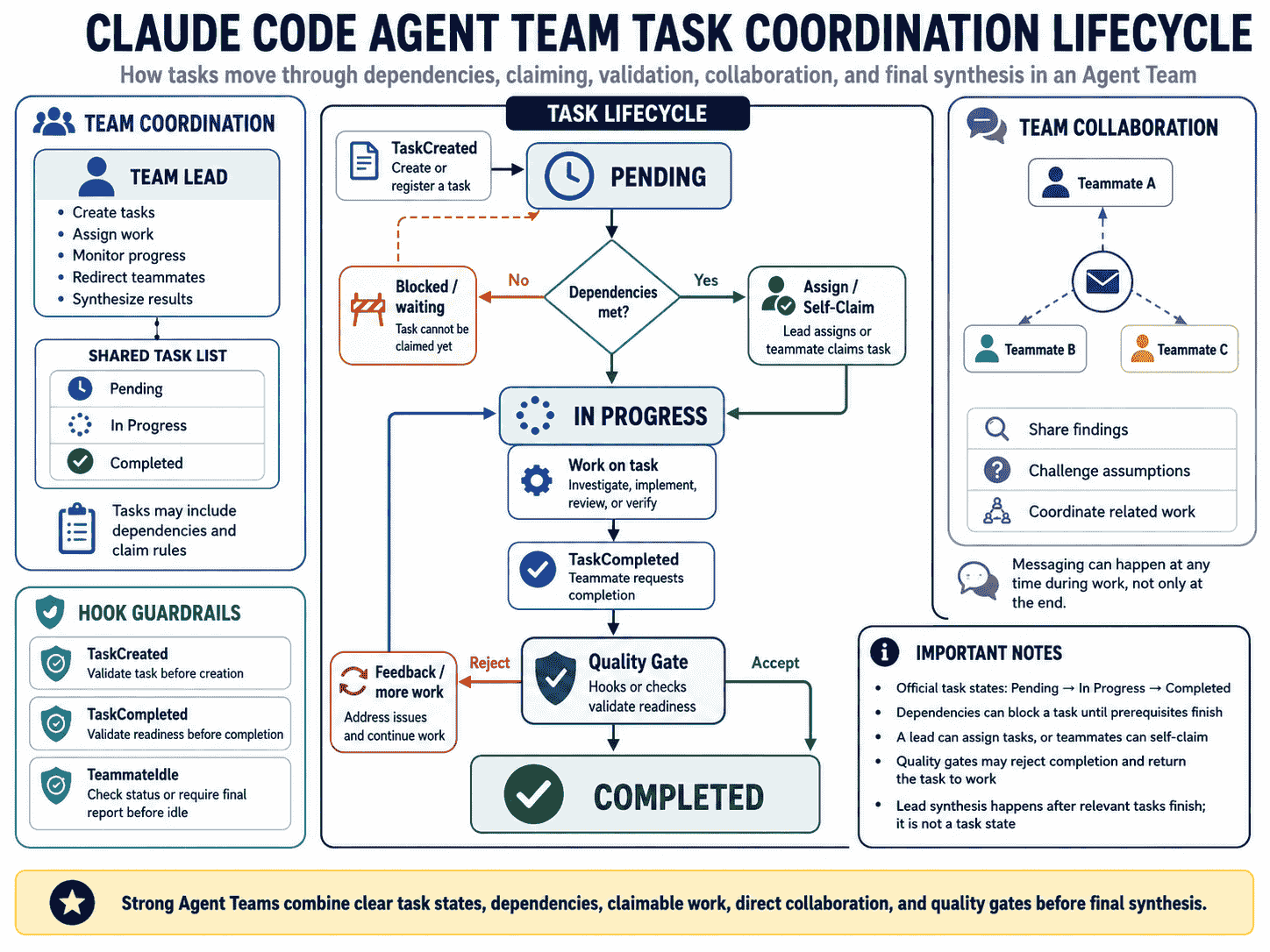
Agent Team tasks use three basic states:
Pending
   ↓
In Progress
   ↓
Completed
A task can also depend on another task.
Analyze schema
      ↓
Design migration
   ┌──┴──┐
   ↓     ↓
Backend  Tests
   └──┬──┘
      ↓
Final verification
A pending task whose dependencies are unresolved cannot be claimed.
Explicit Assignment
Assign the API contract task to api-architect.
Assign the interface implementation to frontend-builder.
Assign migration verification to database-reviewer.
Self-Claiming
After finishing work, a teammate can pick up another unassigned and unblocked task. Claude Code uses file locking around claims to avoid race conditions when several teammates attempt to claim the same task.
Good Task Granularity
A useful task produces a clear deliverable: one review domain, one API module, one test file, one migration plan, or one architecture decision.
Inter-Agent Messaging
Direct messaging is one of the defining features of Agent Teams.
Use messaging for information that changes another teammate's work:
- A backend teammate discovers that an API contract differs from the design.
- A reviewer finds a security issue in code another teammate is still implementing.
- A test teammate discovers an edge case that requires an implementation change.
- Two investigators realize their debugging hypotheses overlap.
Avoid Excessive Chat
Message another teammate only when the information:
- Changes their assumptions
- Blocks their task
- Reveals a cross-module dependency
- Invalidates or confirms a shared hypothesis
- Requires a coordinated interface change
Models and Reasoning Effort
You can request particular models when spawning teammates or configure a default teammate model. Do not assume every teammate automatically follows the lead's current /model selection.
Teammates inherit the lead's effort level.
Use Model Selection Intentionally
- Use a stronger model for architecture or adversarial review.
- Use a faster model for structured repository exploration or repetitive verification.
- Keep model capability comparable when independent agents are testing competing hypotheses.
Require Plan Approval Before Implementation
For risky work, ask a teammate to plan before editing.
Spawn an architect teammate to refactor the authentication module.

Require plan approval before implementation.

Only approve a plan if it:
- Preserves the current public API.
- Includes authorization regression tests.
- Does not change the database schema.
- Includes a rollback strategy.
- Identifies every file that will be modified.
The teammate remains in read-only plan mode until the lead approves the plan. If rejected, the teammate revises and resubmits.
In-Process and Split-Pane Modes
In-Process
All teammates run inside the main terminal interface. This is the current default and requires no additional terminal setup.
Split Panes
Each teammate receives its own visible terminal pane. This is useful when you want to watch several teammates at once, but it requires supported tooling such as tmux or iTerm2.
Keep workflow logic independent of the display mode.
Use Custom Subagent Definitions as Teammates
Reusable custom subagent definitions can also become teammate roles.
Spawn a teammate using the security-reviewer agent type
to audit the authentication module.
The teammate can reuse the definition's model and tool restrictions.
However, teammate execution is not identical to ordinary subagent execution. The skills and mcpServers fields from the subagent definition are not applied when that definition runs as a teammate. The teammate loads project and user Skills and MCP configuration like a regular Claude Code session instead.
For reusable agent definitions, see Claude Code Subagents and Custom Agent Examples.
Hooks and Quality Gates
Hooks can make Agent Teams more reliable by enforcing checks around team events.
TaskCreatedTaskCompletedTeammateIdle
TaskCompleted Quality Gate
TaskCompleted
        ↓
Check required evidence
        ↓
Tests passed?
Type check passed?
Required files updated?
        ↓
   Yes / No
    ↓     ↓
Complete  Reject completion
          + feedback
A task should not be considered correct simply because a teammate marked it complete.
TeammateIdle Quality Gate
Before a teammate goes idle, a hook can require a final report, verification result, or unresolved-risk summary.
TaskCreated Quality Gate
Prevent vague tasks from entering the shared list by requiring scope, deliverable, ownership, or verification information.
For more on lifecycle automation, see Claude Code Hooks examples and automation workflows.
Permissions and Security
Teammates start with the lead's permission settings, and permission prompts surface in the lead session.
Do Not Use Broad Permissions Just to Reduce Friction
If a teammate should be read-only, define a reusable role with restricted tools rather than granting wide permissions to every worker.
Agents Cannot Delegate Your Consent
A message from another teammate is not equivalent to user approval. Do not design a workflow where one agent claims another agent approved a sensitive action.
Separate Investigation From Mutation
Security Research Team
        ↓
Evidence and plan
        ↓
Lead review
        ↓
Approved implementation teammate
        ↓
Independent verification
Context and Communication
Each teammate has its own context window. It receives the spawn prompt and loads project context, but it does not inherit the lead's full conversation history.
Include in the Spawn Prompt
- The exact objective.
- Relevant paths.
- Important architecture facts.
- Known constraints.
- Expected deliverable.
- What not to modify.
- Verification requirements.
- Who should receive important findings.
Do Not Paste Everything
Context isolation loses its value if every teammate receives an enormous copy of the same irrelevant information.
Token Usage and Cost
Agent Teams can consume significantly more tokens than a single session. Each active teammate has its own context and reasoning.
Cost generally grows with the number of teammates, session length, duplicated repository exploration, model choice, and communication overhead.
Start With a Small Team
For many tasks, three to five teammates is a useful starting range. More teammates do not guarantee proportionally faster work.
Best Claude Code Agent Team Examples
Example 1: Parallel Pull Request Review Team
Create an agent team to review the current pull request.

Spawn four teammates:

- correctness-reviewer:
  Verify requirement coverage, logic, edge cases, and error handling.

- security-reviewer:
  Check authentication, authorization, trust boundaries, secret handling,
  injection risk, and sensitive data exposure.

- test-reviewer:
  Review changed behavior and identify missing regression, failure,
  authorization, and boundary tests.

- compatibility-reviewer:
  Check API, database, schema, dependency, runtime, and backward compatibility.

Rules:
- Work independently first.
- Then share confirmed findings.
- Challenge any finding without evidence.
- Remove duplicates.
- Do not modify files.

The lead should return one prioritized merge-readiness report.
Example 2: Competing Hypothesis Debugging Team
Users report that the realtime connection closes after the first message.

Create five teammates.

Give each teammate a different root-cause hypothesis:
1. Client lifecycle bug
2. Server connection cleanup
3. Authentication expiration
4. Proxy or timeout behavior
5. Protocol or message handling

Each teammate should:
- Gather evidence for its hypothesis.
- Look for evidence that disproves it.
- Share important evidence with the other investigators.
- Challenge conflicting theories.

Do not modify code during the investigation.

The lead should produce:
- Surviving hypotheses
- Rejected hypotheses and evidence
- Most likely root cause
- Minimal reproduction
- Recommended fix
- Verification plan
Example 3: Frontend, Backend, and Tests Feature Team
Implement the new workspace invitation flow with an agent team.

Use four teammates:

api-contract:
- Define request, response, errors, and permission behavior.
- Do not edit implementation files.

backend:
- Own server routes and services.
- Wait for the API contract task.

frontend:
- Own the invitation interface and client interaction.
- Wait for the API contract task.

tests:
- Prepare test cases while the contract is being designed.
- After implementation, add integration and end-to-end coverage.

File ownership must not overlap.

The lead should coordinate dependencies and run final verification.
Example 4: Architecture Research Team
Create an architecture research team for replacing the current job queue.

Spawn teammates for:
- Current architecture mapping
- Candidate technology evaluation
- Migration risk analysis
- Operational and observability requirements
- Devil's advocate review

Do not modify files.

Each teammate must cite repository evidence for current-system claims.

Have the teammates exchange conclusions and challenge assumptions.

The lead should return:
- Current-state architecture
- Requirements
- Evaluated options
- Trade-off table
- Migration risks
- Recommended direction
- Open questions
Example 5: Production Incident Investigation Team
Create an incident investigation team.

The incident:
API error rate increased after the latest deployment.

Spawn teammates for:
- Deployment diff analysis
- Application logs and error signatures
- Database behavior
- Infrastructure and dependency changes
- Request tracing and reproduction

Rules:
- Investigation only.
- Do not deploy or change production.
- Record timestamps and evidence.
- Share discoveries that invalidate another teammate's hypothesis.

The lead should maintain:
- Incident timeline
- Confirmed symptoms
- Ruled-out causes
- Most likely cause
- Immediate mitigation options
- Permanent fix plan
- Verification and monitoring plan
Example 6: Security Review Team
Create a read-only security review team.

Use specialists for:
- Authentication and sessions
- Authorization and tenant isolation
- Input and output handling
- Secrets and sensitive data
- Dependency and configuration risk

Require repository evidence for every finding.

Do not report generic security advice.

For each confirmed issue:
- Severity
- Attack or failure path
- File and location
- Evidence
- Impact
- Recommended remediation
- Verification method

The lead should remove duplicates and distinguish confirmed vulnerabilities
from defense-in-depth suggestions.
Example 7: Database Migration Team
Create an agent team to plan the user-account migration.

Roles:
- schema-analyst
- migration-planner
- compatibility-reviewer
- rollback-reviewer
- test-planner

Require plan approval before any teammate edits migration files.

The final plan must cover:
- Existing data compatibility
- Backfill strategy
- Deployment ordering
- Locking or performance risks
- Rollback
- Mixed-version behavior
- Validation queries
- Tests
Example 8: Performance Regression Team
Create a team to investigate the performance regression.

Assign:
- benchmark-analyst
- database-query-reviewer
- frontend-performance-reviewer
- backend-profiling-reviewer

Each teammate should establish a measurable baseline.

Do not propose optimization without evidence.

Share measurements and identify whether regressions are independent
or caused by the same underlying change.

The lead should rank fixes by expected impact, confidence, and implementation risk.
Example 9: API Compatibility Review Team
Review the proposed API v2 changes with an agent team.

Use teammates for:
- Request compatibility
- Response compatibility
- Error and status-code behavior
- SDK and client compatibility
- Database and migration effects

Create a compatibility matrix.

Identify:
- Breaking changes
- Behavior changes
- Safe additive changes
- Migration requirements
- Deprecation opportunities
- Required tests
Example 10: Monorepo Refactoring Team
Create an agent team to refactor the shared validation package.

First assign one architecture task to map consumers.

After that task completes, create independent package tasks.

Each implementation teammate must own a non-overlapping package.

Create a final verification task that runs:
- Affected tests
- Type checks
- Linting
- Build
- Public API compatibility review

Do not allow two teammates to edit the shared package entrypoint simultaneously.
Example 11: Dependency Upgrade Team
Create an agent team to upgrade the framework major version.

Roles:
- release-notes researcher
- repository impact mapper
- configuration migrator
- application-code migrator
- test and build verifier

The research teammates should work first.

Implementation tasks may begin only after the lead publishes a migration checklist.

Keep unrelated dependency upgrades out of scope.
Example 12: Release Readiness Team
Create a release readiness team.

Use teammates for:
- Test status
- Migration readiness
- Security-sensitive changes
- Configuration and environment changes
- User-facing documentation
- Rollback readiness

Do not modify production systems.

The lead should return:
- Blocking issues
- Non-blocking risks
- Verification evidence
- Rollback readiness
- Release recommendation
Example 13: Accessibility Review Team
Create an accessibility review team for the redesigned dashboard.

Use teammates for:
- Keyboard navigation and focus
- Semantics and ARIA
- Forms and validation
- Visual contrast and state communication
- Screen-reader flow

Review independently, then merge duplicate findings.

For each issue include:
- User impact
- Relevant element or file
- Evidence
- Recommended change
- Verification method
Example 14: Test Failure Investigation Team
The CI suite has multiple failures after this branch.

Create an investigation team.

Divide failures by:
- Unit tests
- Integration tests
- End-to-end tests
- Type or build failures

Determine which failures share a root cause.

Do not weaken tests.

The lead should distinguish:
- Product defect
- Test defect
- Environment failure
- Flaky behavior
- Intentional behavior change requiring test updates
Example 15: Documentation and Implementation Team
Create an agent team for the new public API feature.

Assign:
- implementation owner
- API example writer
- reference documentation updater
- migration guide reviewer
- verification reviewer

Documentation teammates may draft based on the approved API contract
while implementation proceeds.

Before completion, verify that all documented examples match the final API.
Example 16: Billing Change Review Team
Create a read-only review team for the subscription entitlement changes.

Roles:
- billing-state reviewer
- webhook reviewer
- entitlement reviewer
- migration reviewer
- test reviewer

Focus on:
- Idempotency
- Duplicate events
- Out-of-order events
- Cancellation
- Expiration
- Plan transitions
- Existing customer compatibility
- Server-side entitlement enforcement

Do not modify code.

Require evidence for every finding.
Example 17: Multi-Service Feature Team
Implement the audit-log feature across services.

Create teammates for:
- event contract
- API service
- worker service
- admin interface
- tests

The event-contract teammate owns the schema and must finish first.

After approval, the API, worker, and interface tasks can run in parallel.

The test teammate should review all contracts and add cross-service integration coverage.
Example 18: Repository Exploration Team
Create a read-only repository exploration team.

Each teammate should map one area:
- Application entrypoints
- Authentication and permissions
- Data model and migrations
- Background jobs
- Testing and CI
- Deployment and configuration

Return concise maps with canonical files and important dependencies.

The lead should synthesize one onboarding guide without duplicating README content.
Example 19: Technology Evaluation Team
Evaluate whether this project should adopt a new caching layer.

Spawn teammates for:
- Current bottleneck evidence
- Candidate A
- Candidate B
- Operational complexity
- Cost and failure modes
- Devil's advocate

Do not recommend a new dependency unless repository evidence shows
a problem the current stack cannot reasonably solve.

The final report should separate facts, assumptions, benchmarks, and recommendations.
Example 20: Independent Implementation and Verification
Create an agent team for this feature.

Teammate 1:
- Implement the feature from the approved requirements.

Teammate 2:
- Independently derive acceptance tests from the requirements.
- Do not read Teammate 1's reasoning.

Teammate 3:
- Review architecture and compatibility.

After implementation:
- Run Teammate 2's tests.
- Have Teammate 3 review the actual diff.
- Let the lead reconcile failures and findings.

Do not declare completion until independent verification passes.
Example 21: Changelog and Release Communication Team
Create a release communication team.

Assign:
- change summarizer
- breaking-change reviewer
- migration-note writer
- user-facing release-note writer

Base every statement on the actual diff and merged changes.

Do not invent benefits or compatibility claims.

The lead should produce:
- Developer changelog
- User-facing notes
- Migration notice
- Known limitations
Example 22: Privacy and Data Handling Review Team
Create a privacy review team for the new analytics feature.

Use teammates for:
- Data collection inventory
- Storage and retention
- Logging review
- Access control
- Third-party transmission
- User deletion and export behavior

Do not make legal conclusions.

Report technical data flows, controls, gaps, and verification evidence.
Example 23: Failure Recovery Design Team
Create an architecture team for failure recovery.

Assign independent reviewers to:
- Retry and idempotency
- Queue failure handling
- Database transaction boundaries
- External API degradation
- Observability and alerts

Have reviewers challenge recovery assumptions.

The lead should return:
- Failure-mode matrix
- Current controls
- Gaps
- Recommended safeguards
- Required tests
Example 24: Refactoring With Ownership Boundaries
Refactor the old notification system with an agent team.

First map module boundaries.

Then assign each teammate a separate module.

Rules:
- One owner per file.
- Shared interfaces require lead approval.
- Do not perform unrelated formatting.
- Every module must keep existing public behavior.
- Add regression coverage before deleting old paths.

Finish with an independent compatibility review.
Multi-Agent Workflow Patterns
Pattern 1: Parallel Specialists
                 Lead
          ┌──────┼──────┐
          ↓      ↓      ↓
      Security  Tests  Performance
          └──────┼──────┘
                 ↓
          Synthesized review
Use when several perspectives can evaluate the same artifact independently.
Pattern 2: Competing Hypotheses
Hypothesis A ──┐
Hypothesis B ──┼── Share evidence → Challenge → Consensus
Hypothesis C ──┤
Hypothesis D ──┘
Use when the root cause is uncertain and anchoring is a risk.
Pattern 3: Dependency Fan-Out
Architecture / Contract
          ↓
   ┌──────┼──────┐
   ↓      ↓      ↓
Frontend Backend Tests
   └──────┼──────┘
          ↓
      Verification
Use when one design task unlocks several independent implementation tasks.
Pattern 4: Implement and Independently Verify
Requirements
   ├── Implementation teammate
   ├── Test-design teammate
   └── Review teammate
            ↓
      Lead reconciliation
Use when confidence matters more than raw speed.
Pattern 5: Research Then Execute
Research teammates
        ↓
Shared conclusions
        ↓
Lead-approved plan
        ↓
Implementation teammates
        ↓
Verification
Use for unfamiliar systems, major migrations, or high-risk changes.
Avoiding File Conflicts
File conflicts are one of the easiest ways to make parallel implementation counterproductive.
Assign Explicit Ownership
frontend-builder:
Owns:
- app/dashboard/
- components/dashboard/

backend-builder:
Owns:
- services/dashboard/
- app/api/dashboard/

test-builder:
Owns:
- tests/dashboard/
- e2e/dashboard.spec.ts
Centralize Shared Contracts
If several teammates depend on one type, schema, or API contract, assign that shared artifact to one owner first.
Use Review Instead of Concurrent Editing
When two agents need to work on the same file, let one edit while the other reviews or proposes changes.
Monitoring and Steering Teammates
Do not treat an Agent Team as an unattended batch job.
Monitor for duplicated work, stalled tasks, agents working outside scope, conflicting assumptions, same-file edits, speculative conclusions, and premature completion.
Useful Steering Prompts
Wait for all blocking teammates before proceeding.Ask the security reviewer to challenge the compatibility finding.Reassign the unclaimed test task to test-reviewer.Do not implement yet. Resolve the API contract disagreement first.Have every teammate report remaining uncertainty before final synthesis.Shutting Down Teammates
When a teammate is no longer needed, ask the lead to shut it down by name.
Ask the researcher teammate to shut down.The lead sends a shutdown request. The teammate can finish its current work and exit gracefully. Current Claude Code cleans up team runtime state automatically when the session ends.
Common Claude Code Agent Team Mistakes
Spawning Too Many Teammates
More agents increase token usage and communication overhead.
Better: start with a small team of distinct specialists.
Giving Everyone the Same Task
Five teammates running the same vague review often produce duplicated results.
Better: assign different lenses or hypotheses.
Allowing Same-File Editing
Concurrent changes can overwrite one another.
Better: establish file or module ownership.
Using Agent Teams for Sequential Work
If B cannot begin until A completes and C cannot begin until B completes, a team adds little parallel value.
Better: use a single session, subagents, or a structured Dynamic Workflow.
Failing to Give Spawn Context
Teammates do not inherit the lead's full conversation history.
Better: provide objective, paths, constraints, and deliverable in the spawn prompt.
No Verification Gate
A task being marked complete is not proof that it is correct.
Better: require tests, independent review, or a TaskCompleted hook.
Letting the Lead Implement Everything
The lead may sometimes begin work itself instead of waiting.
Better: explicitly tell it to wait for teammates when the workflow depends on their results.
Using Teams to Avoid Permission Design
Spawning more agents does not make broad permissions safer.
Better: define restrictive roles and pre-approve only justified operations.
Manually Editing Runtime Team Configuration
Generated team state is runtime data, not a reusable project configuration surface.
Better: create reusable subagent definitions for roles.
Ignoring Cost
Parallelism that saves a small amount of time but multiplies token usage may not be worthwhile for routine work.
Better: reserve teams for tasks where parallel exploration or collaboration creates meaningful value.
Current Agent Team Limitations
Agent Teams are experimental, and current limitations should influence workflow design.
- In-process teammates are not restored by normal session resume or rewind.
- Task status can occasionally lag behind work actually completed.
- Shutdown may wait for an active request or tool call to finish.
- A session has one team rather than multiple separately named teams.
- Teammates cannot create nested Agent Teams.
- The main session remains the team lead for the life of the session.
- Teammates begin with the lead's permission mode.
- Split-pane mode requires supported terminal tooling.
- In-process teammates have restrictions around launching their own background subagents.
These limitations are another reason to design teams around bounded, observable work rather than extremely long autonomous projects.
Using PrompTessor to Improve Agent Team Instructions
Multi-agent workflows amplify both good instructions and bad instructions.
A vague prompt given to one agent may waste one context window. A vague prompt given to five teammates can multiply duplication, speculation, and unnecessary token usage.
Create a team and build the feature. Make sure everything is correct.
This does not define why a team is needed, which roles should exist, how work should be divided, which files each teammate may modify, which dependencies block other tasks, how agents should communicate, what evidence is required, or what completion means.
PrompTessor can help analyze and improve rough multi-agent instructions before they are used to spawn a team.
A practical optimization process is:
- Define the shared objective.
- Identify which work can genuinely run in parallel.
- Give each teammate a distinct role and deliverable.
- Define file or system ownership.
- Add dependencies where parallel work is not yet safe.
- Specify when teammates should communicate.
- Define evidence and verification requirements.
- Add plan approval for risky changes.
- Add completion gates.
- Tell the lead how to synthesize disagreements.
The same qualities that matter for a single coding prompt become more important in a team: clarity, specificity, context, constraints, scope, verification, and explicit outputs.
For reusable procedures that teammates can follow, see Claude Code Skills and SKILL.md examples.
Claude Code Agent Team Checklist
- Does this task actually benefit from parallel work?
- Do teammates need to communicate directly?
- Would subagents be sufficient?
- Are teammate roles distinct?
- Does every teammate have a clear deliverable?
- Have important dependencies been identified?
- Can file ownership remain non-overlapping?
- Does every teammate have enough spawn context?
- Are permissions appropriate for each role?
- Should risky teammates require plan approval?
- Are there quality gates before completion?
- Should findings be challenged by another teammate?
- Has the lead been told when to wait?
- Is there a final independent verification step?
- Is the expected token cost justified?
- Can the team start smaller?
- Does the workflow account for current experimental limitations?
Official Resources
- Claude Code Agent Teams Documentation
- Claude Code Custom Subagents
- Claude Code Dynamic Workflows
- Claude Code Hooks
- Claude Code Skills
FAQ About Claude Code Agent Teams
What are Claude Code Agent Teams?
Claude Code Agent Teams are an experimental multi-agent feature that coordinates several independent Claude Code sessions. One session acts as the team lead, while teammates work in separate context windows, share a task list, and can communicate directly with each other.
Are Claude Code Agent Teams enabled by default?
No. Agent Teams are experimental and disabled by default. Enable them by setting CLAUDE_CODE_EXPERIMENTAL_AGENT_TEAMS=1 in your environment or Claude Code settings.
How do I enable Claude Code Agent Teams?
Set CLAUDE_CODE_EXPERIMENTAL_AGENT_TEAMS to 1. In settings.json, place it under the env object, then start a Claude Code session and explicitly ask Claude to spawn teammates for a task that benefits from parallel work.
How are Agent Teams different from subagents?
Subagents are focused workers that report results back to the main agent and do not communicate with each other. Agent Team teammates are independent Claude Code sessions that share tasks and can message each other directly.
How are Agent Teams different from Dynamic Workflows?
In Agent Teams, the team lead decides what to assign next turn by turn. In Dynamic Workflows, a JavaScript orchestration script controls branching, loops, agent execution, and intermediate results.
When should I use an Agent Team?
Use an Agent Team when independent workers can explore or implement separate parts in parallel and benefit from sharing findings, challenging one another, or coordinating through shared tasks.
When should I avoid Agent Teams?
Avoid Agent Teams for small routine tasks, mostly sequential work, heavy same-file editing, or workflows with so many dependencies that coordination overhead outweighs parallelism.
How many teammates should I use?
There is no simple hard limit in the current guidance, but starting with roughly three to five teammates works well for many workflows. Scale up only when additional work is genuinely independent.
Can teammates talk to each other?
Yes. Agent Team teammates can send messages directly to one another. This is one of the main differences between Agent Teams and subagents.
Do teammates share the lead's conversation history?
No. Each teammate has its own context window. It receives the spawn prompt and loads project context such as applicable CLAUDE.md files, Skills, and MCP configuration, but the lead's conversation history does not carry over.
Do teammates share a task list?
Yes. The team has a shared task list. Tasks can be pending, in progress, or completed, and tasks can depend on other tasks before they become claimable.
Can teammates claim tasks by themselves?
Yes. The lead can assign tasks explicitly, and teammates can self-claim eligible unassigned tasks. Claude Code uses file locking to prevent two teammates from claiming the same task at the same time.
Can I require a teammate to submit a plan before editing code?
Yes. You can request plan approval. The teammate stays in read-only plan mode until the lead approves the plan. If the lead rejects it, the teammate revises and resubmits.
Can I message an individual teammate directly?
Yes. In in-process mode you can select a teammate from the agent panel and message it. In split-pane mode you can interact with the teammate in its own pane.
What display modes do Agent Teams support?
Agent Teams support in-process mode and split-pane mode. In-process works in one terminal, while split panes require supported terminal tooling such as tmux or iTerm2.
Do teammates inherit the lead's model?
Not automatically in every configuration. Claude Code provides a default teammate model setting, and you can request a model when spawning teammates. Teammates inherit the lead's effort level.
Do teammates inherit permissions?
Teammates start with the lead's permission settings. Permission prompts bubble up to the lead session, and individual teammate modes can be changed after spawning.
Can I use custom subagent definitions as Agent Team teammates?
Yes. You can ask Claude to spawn a teammate using an existing custom subagent type. The teammate honors that definition's tool allowlist and model, while team coordination tools remain available.
Do Skills and MCP settings from a subagent definition carry over when it becomes a teammate?
The subagent definition's skills and mcpServers frontmatter fields are not applied when that definition is used as a teammate. Teammates instead load Skills and MCP servers from project and user settings like a regular session.
Can Hooks enforce Agent Team quality gates?
Yes. TeammateIdle, TaskCreated, and TaskCompleted Hooks can act as quality gates. For example, a TaskCompleted Hook can reject completion when required verification has not passed.
Can an Agent Team have nested teams?
No. Current Agent Teams do not support nested teams. Only the main lead can manage teammates.
Can I resume an Agent Team session?
Agent Team resumption has limitations. In-process teammates are not restored by session resume or rewind, so a resumed lead may need to spawn replacement teammates.
Are Agent Teams expensive to run?
They can be. Each teammate is a separate Claude instance with its own context window, so token usage grows with the number of active teammates. Use teams when parallelism and collaboration justify the extra cost.
What is the best first Agent Team workflow to try?
Start with research, review, or investigation tasks that have clear independent scopes, such as parallel pull request review, competing debugging hypotheses, or architecture research. These demonstrate the benefit of collaboration without creating file-edit conflicts.
Conclusion
Claude Code Agent Teams extend AI-assisted development from delegation into collaboration.
The important shift is not simply that more agents can run at once. Independent Claude Code sessions can coordinate through shared tasks, exchange messages, challenge findings, and work toward one result under a team lead.
The strongest Agent Team workflows have clear boundaries:
- Split the objective into independent work.
- Give every teammate a distinct role.
- Provide enough context in the spawn prompt.
- Use dependencies where parallel execution is not yet safe.
- Keep file ownership separate.
- Use direct communication only when it changes another teammate's work.
- Add plan approval for risky implementation.
- Use Hooks or independent reviewers as quality gates.
- Monitor the team rather than leaving it unattended.
- Wait for blocking teammates before final synthesis.
Do not use an Agent Team simply because multi-agent development sounds more advanced.
For a focused side task, a subagent is usually cheaper and simpler.
For a reusable procedure, a Skill is a better abstraction.
For deterministic lifecycle automation, use Hooks.
For repeatable large-scale orchestration where code should control loops and branching, use Dynamic Workflows.
Use Agent Teams when collaboration itself is part of the solution.
When teammates have independent scopes, meaningful reasons to exchange information, and clear verification requirements, Agent Teams can turn one Claude Code session into a coordinated development system rather than a collection of disconnected agents.
Build better prompts in one workspace
Generate prompts from ideas, analyze and optimize quality, refine with feedback, reverse-engineer content, and save reusable prompts in your Prompt Library.
Try PrompTessor Free